Transform your Google Forms with custom headers, enhancing engagement and visual appeal through static or animated designs.
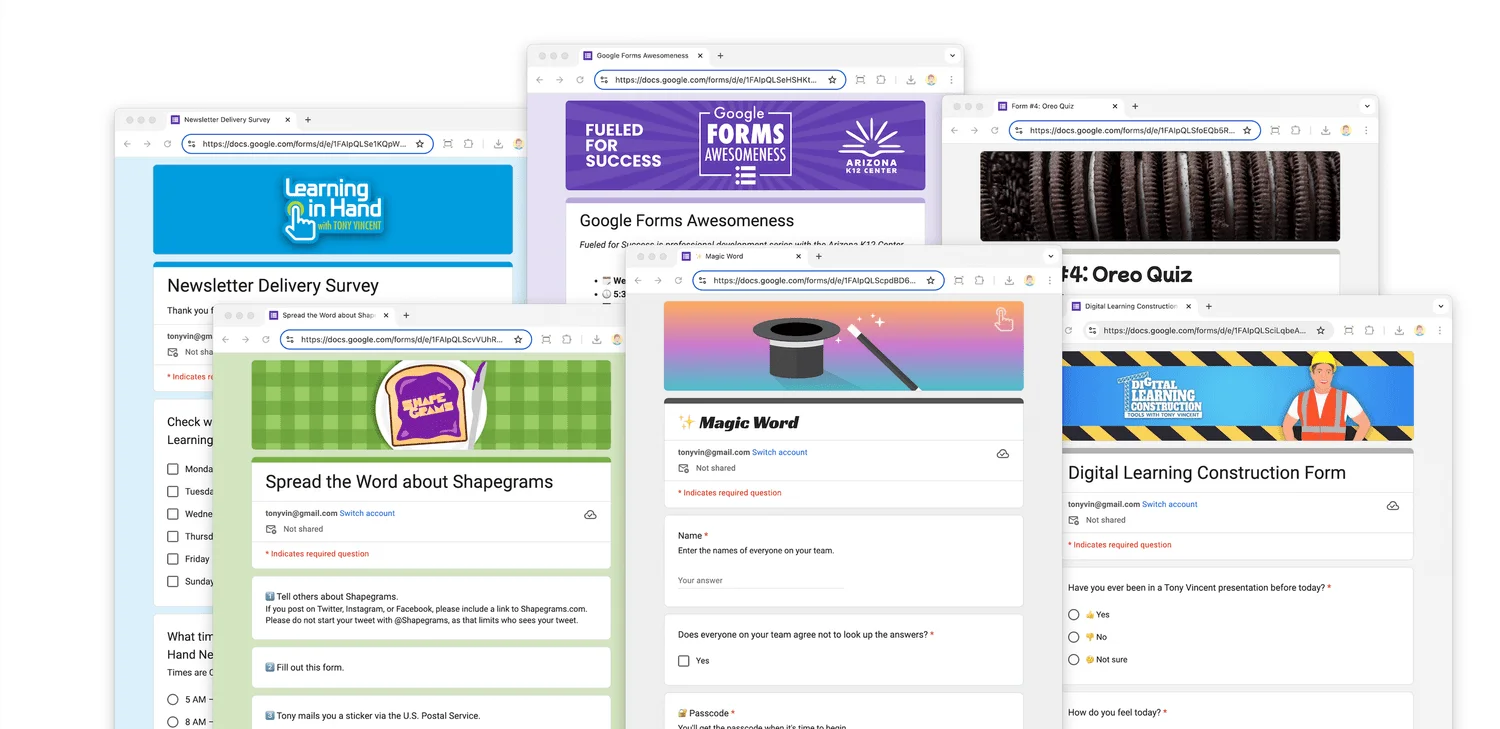
A header in Google Forms is more than just a top label; it's a canvas that sets your form's visual tone. By incorporating text, images, or unique design elements, headers capture attention and convey essential information, whether you're crafting a survey, quiz, or feedback form. The importance of first impressions cannot be understated, particularly in settings where engagement is critical. A well-designed header can mean the difference between a respondent clicking away or delving into the form.
Adding a Header: The Basics
The process to add a header is straightforward. Click the Customize Theme button while editing your form. You have a lot of flexibility when it comes to the images you can upload; however, there's magic in stick to an optimal dimension of 1600 x 400 pixels, maintaining a 4:1 aspect ratio. This ensures your visuals display well across devices. Unlike Google Classroom headers, Google Forms maintains your image's brightness and proportions, allowing for a full display without cropping or dimming. This is more significant than it looks, as the visual integrity of your header can influence the viewer's perception right from the start.

The Art of Crafting Effective Headers
To create effective headers, many users turn to graphic design tools such as Google Slides or Canva, exporting their final designs in PNG or JPG formats. This enables endless customization to incorporate branding elements like logos, school mascots, and thematic color schemes. The options here are limited only by your creativity. For instance, a poorly designed header can dilute the overarching message of your form or even confuse the respondent, while a thoughtfully crafted one enhances clarity.
There’s also a notable shift towards more engaging designs that reflect personal or institutional identity. Headers that resonate with the audience can create a connection. Teachers, for example, often favor adding fun elements like Bitmoji graphics or images of school mascots to make surveys feel more approachable. This personal touch can lead to better response rates, as people are generally more willing to engage when they feel a sense of ownership or connection.
Incorporating Animated Elements
For those looking to elevate their forms, headers can also feature animated GIFs, providing a dynamic visual element. Create these in Google Slides by duplicating slides with slight alterations, then exporting the slides as a PDF before converting to GIF format using tools like EZgif. Canva also supports direct GIF exports from animated pages. Animated visuals grab attention but tread carefully: if your GIFs are too large, they can slow down the form’s loading time, a risk not worth taking.

Aim to keep your GIFs under 2MB; tools like EZgif’s optimizer can compress files without sacrificing quality. (And this is the part most people overlook.) A light GIF can engage respondents while a heavy one discourages them, setting up a classic case of diminishing returns. Ultimately, the aim is to enhance the experience, not frustrate your audience.
Theme Customization: Color and Cohesion
Google Forms smartly pulls colors from uploaded header images to create a tailored theme for your form. This capability allows users to choose colors that harmonize with the visual elements, enhancing coherence and professionalism throughout the form. Colors aren't just decoration—they convey emotions. A misalignment can distract or even hinder responses.

Implications and Future Outlook
As digital communication evolves, the way forms are designed will continue to play an integral role in user engagement. With the rise of remote collaboration, learning, and feedback mechanisms, creating visually appealing forms is more necessary than ever. Expect advanced features that allow even deeper customization and interactivity. For example, more sophisticated animation options or responsive design features could soon become standard.
The increasing emphasis on personalization indicates that users will demand even more flexibility in form design. This means that platforms like Google Forms might incorporate AI-driven suggestions for themes and headers based on the content of your form, streamlining design choices for those less familiar with graphic design.
In short, adding a header to your Google Form is a simple yet effective strategy for enhancing its aesthetic appeal and clarity of message. Whether opting for a static image or an animated visual, employing design tools can help create headers that truly reflect your individual or organizational style. If you’re working in this space, pay close attention to these evolving trends—they could dramatically enhance respondent engagement.
Creating animated headers is a feature of my Funky Forms presentation. For inquiries regarding workshops or presentations, feel free to contact me.


Discussion
Sign in to join the discussion.