Explore how educators can enhance student engagement with preloaded prompts in Google Gemini, enabling tailored learning experiences.
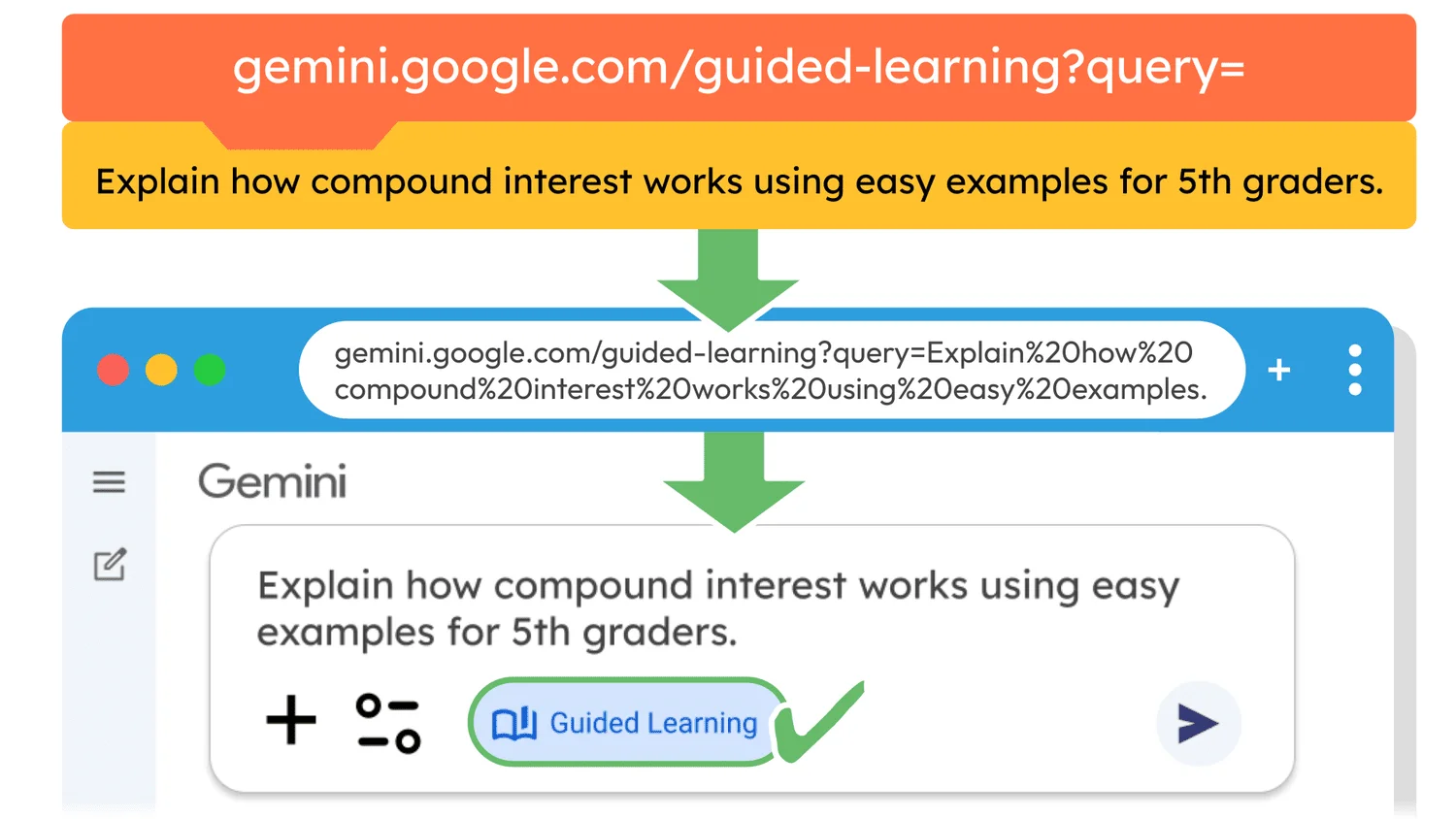
Educators now have a new advantage in Google Gemini with the ability to create links that automatically fill prompts for students. This feature is poised to significantly enhance learning efficiency, providing a clear pathway to more personalized and engaging educational experiences.
Introduction to Google Gemini's Features
Google's foray into educational technology has taken a notable turn with the introduction of Gemini. By integrating tools that directly address educators' needs, Gemini presents a practical solution. For many in the education sector, utilizing technology effectively can mean the difference between a mundane lesson and an engaging learning experience. This new feature allows teachers to create links pre-loaded with questions or prompts, streamlining the interaction for students. You don't need to reinvent the wheel; just use the tools provided to enhance your teaching strategies.
Guided Learning Made Easy
For a practical demonstration, click this link. Upon opening, you'll find the prompt pre-entered in Gemini's input field, with Guided Learning mode activated. Students can tweak the prompt as needed before submitting, allowing them to make it more personal. This flexibility is significant—students often have varying levels of understanding; allowing them to adjust queries can make the learning experience more targeted and effective.
Once submitted, Guided Learning takes over, guiding students through explanations, examples, and follow-up questions. This process can foster self-guided exploration of topics, which is critical in educational settings where independent learning is encouraged. It also makes for a less formal and more approachable medium that might even spark a student’s interest in subjects they find difficult. And let’s be honest: any tool that can help students understand complex financial concepts, like compound interest, without feeling overwhelmed is more important than it looks.
Creating Your Preloaded Prompt Link
Creating a preloaded prompt URL is straightforward. To construct one, start with:
https://gemini.google.com/guided-learning?query=
Simply append your prompt after the equals sign. While it may seem odd to represent spaces in URLs, each space is converted to %20 by your browser. A completed link might look like this:
https://gemini.google.com/guided-learning?query=Explain how compound interest works using easy examples.
Opening that link activates the input in a pre-filled format, allowing direct engagement. The browser processes it to show:
https://gemini.google.com/guided-learning?query=Explain%20how%20compound%20interest%20works%20using%20easy%20examples.
Now, here's the kicker: consider adding the grade level into your prompt for better customization when working with students. Personalizing lessons in this way could elevate a standard educational experience to one that feels tailored to students’ actual needs. While I generally prefer the Gem structure, this method offers a rapid approach to getting students engaged without the setup of a full Gem. It's pretty intuitive.
If you find URL manipulation isn’t your style, there's an alternative. You can use the Gemini Chat Starter. Just enter your desired prompt and click “Copy” to generate a pre-filled link. The ease of access can help educators integrate technology into their classrooms without a steep learning curve.
Comparing with ChatGPT
While ChatGPT features a Study and Learn mode similar to Gemini’s, it lacks the capability to preload prompts via direct URL. At first glance, this might seem like a limitation of ChatGPT. However, you can pre-fill a ChatGPT prompt by formatting a link like this:
https://chat.openai.com/?q=
This feature allows users to open a chat with their prompt already in place. For example, try this ChatGPT link to see it in action. The contrast here isn’t just in technical capabilities; it’s about the user experience. The ability to preload prompts directly in Gemini makes it more practical for live classroom scenarios where quick adaptation is often needed.
Implications and Future Outlook
Given the current state of educational tools, this enhancement in Google Gemini speaks volumes. Educators are constantly seeking ways to streamline lesson planning; this feature could represent a shift in how educators approach lesson delivery. Will this prompt other educational platforms to innovate? It’s a distinct possibility. As more tools like this gain traction, the broader educational ecosystem may evolve, pushing for features that emphasize ease and adaptability.
If you're working in this space, think about how you might incorporate such technology into your teaching methods. The implications are clear: as educational technology makes strides in automation and customization, it could lead to more engaged learners. The offerings from Gemini and its competitors will likely continue to shape the future of education, compelling educators to rethink traditional methodologies.
This feature might seem minor at first, but its ability to spark interest and foster comprehension in students has the potential to create significant changes in how learning occurs. Watch this space; the stakes are high, and the competition is aggressive.



Discussion
Sign in to join the discussion.